



Google Ads (formerly known as Google Adwords) can put businesses in front of customers at the exact moment they search for a product or brand. But paid search can also be exploited by competitors, counterfeiters, impersonators, and other bad actors misusing trademarks or brand assets.
For trademark owners, one distinction is especially important: another advertiser bidding on your trademark does not automatically mean Google considers the ad infringing. Google generally allows trademarks to be used as keywords. What matters more is how the trademark is used in the ad and whether that use is confusing, deceptive, misleading, or otherwise restricted.
This guide explains when Google Ads trademark use may violate policy, what evidence to collect, and how to report a suspected infringement.
TL;DR
- Google generally allows advertisers to bid on trademarked keywords.
- Trademark use in an ad may be restricted when used by a direct competitor or in a confusing, deceptive, or misleading way.
- Google processes complaints against specific advertisers or ads rather than blanket industry-wide restrictions.
- Collect the ad, URL, landing page, search query, location, and trademark information before submitting a report.
- Counterfeit goods and business impersonation may require a different Google reporting route.
- Repeated or rotating ads require ongoing monitoring rather than one-off searches alone.

What is Google Ads trademark infringement?
Google Ads trademark infringement occurs when a trademark is used in advertising in a way that violates the rights of its owner.
Google’s current trademark policy distinguishes between bidding on trademarked keywords and using a trademark within the advertisement itself.
In practice, problematic uses can include:
- A direct competitor using your trademark in its ad copy.
- An advertiser using your brand name in a way that implies an affiliation that does not exist.
- An ad designed to make users believe they are clicking your official website.
- Counterfeit sellers promoting fake products carrying your trademark.
- Ads copying your logo or branding and directing users to an impersonating site.
For other forms of ad impersonation, see our guide to reporting fake ads.
Can competitors bid on your trademark in Google Ads?
Yes. In many cases, competitors can bid on your trademark as a keyword.
That means an ad appearing when somebody searches for your brand name does not automatically qualify for removal.
Google focuses on how the trademark appears in the advertisement. It may restrict trademark use when the mark is used in an ad from a direct competitor or when it is used in a confusing, deceptive, or misleading way.
Some uses may also be permitted, such as genuine resellers clearly selling the relevant goods or services or informational websites providing information about trademarked products.
The key question is therefore not simply:
“Did somebody bid on our trademark?”
It is:
“How is our trademark being presented to the user?”
Trademark bidding vs. trademark misuse
| Situation | Likely issue | Best first action |
| Competitor bids on your trademark but does not use it in the ad | Keyword bidding alone is generally allowed | Monitor for other violations |
| Direct competitor uses your trademark in its ad | Potential trademark-policy issue | Consider a trademark complaint |
| Genuine reseller clearly advertises your products | May be permitted | Check reseller criteria |
| Advertiser implies it is your official business | Potential trademark or misrepresentation issue | Document and report |
| Ad promotes counterfeit products | Counterfeit policy issue | Use the counterfeit route |
| Ad copies your branding and sends users to a fake site | Potential impersonation and trademark issue | Report the ad and investigate the site |
What evidence should you collect before reporting an ad?
Before submitting a complaint, capture the infringement while it is still live.
Record:
- The full ad text.
- A screenshot of the ad.
- The advertiser or destination URL.
- The landing-page URL.
- The search query that triggered the ad.
- The country or location where the ad appeared.
- The date you found it.
- Your trademark name and registration information.
- Why the use is misleading or otherwise problematic.
- Your relationship to the trademark owner if submitting on their behalf.
The landing page can be particularly important. An ad that looks relatively neutral may lead to a website impersonating your business, selling counterfeits, or falsely claiming to be an authorized seller.
Visual evidence matters too. Bad actors may copy logos even when the trademark is not prominent in the text. Our guide to logo misuse detection covers ways brands can identify modified or unauthorized logo use.
How to report Google Ads trademark infringement
Google’s interface may change over time, but the complaint process follows the same basic logic: identify the affected Google product, select the legal or trademark issue, provide rights-owner information, identify the offending advertisement, and submit evidence.
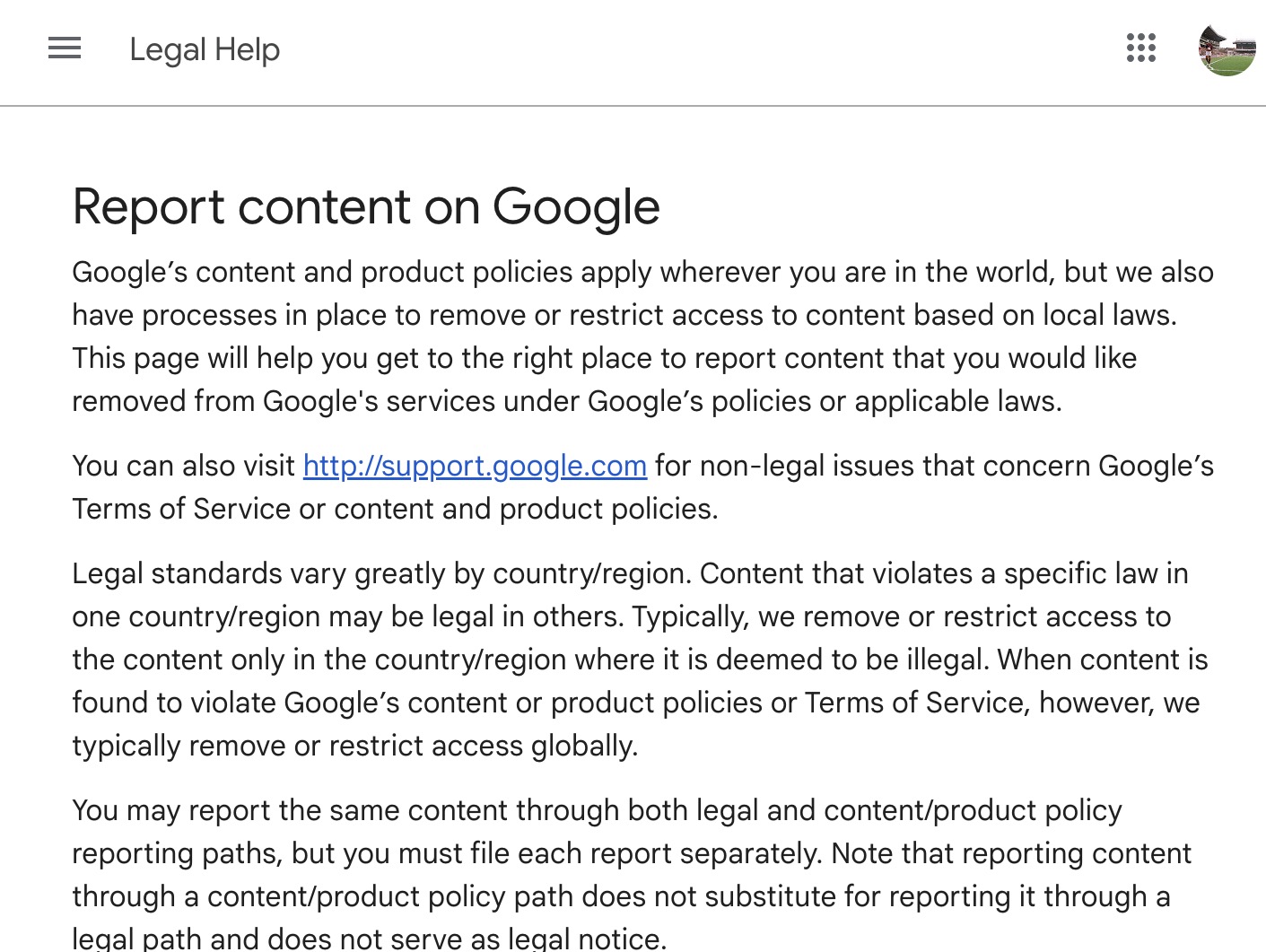
Step 1: Go to Google’s reporting system
Start with Google’s legal or trademark reporting process and follow the route for reporting content associated with Google Ads.
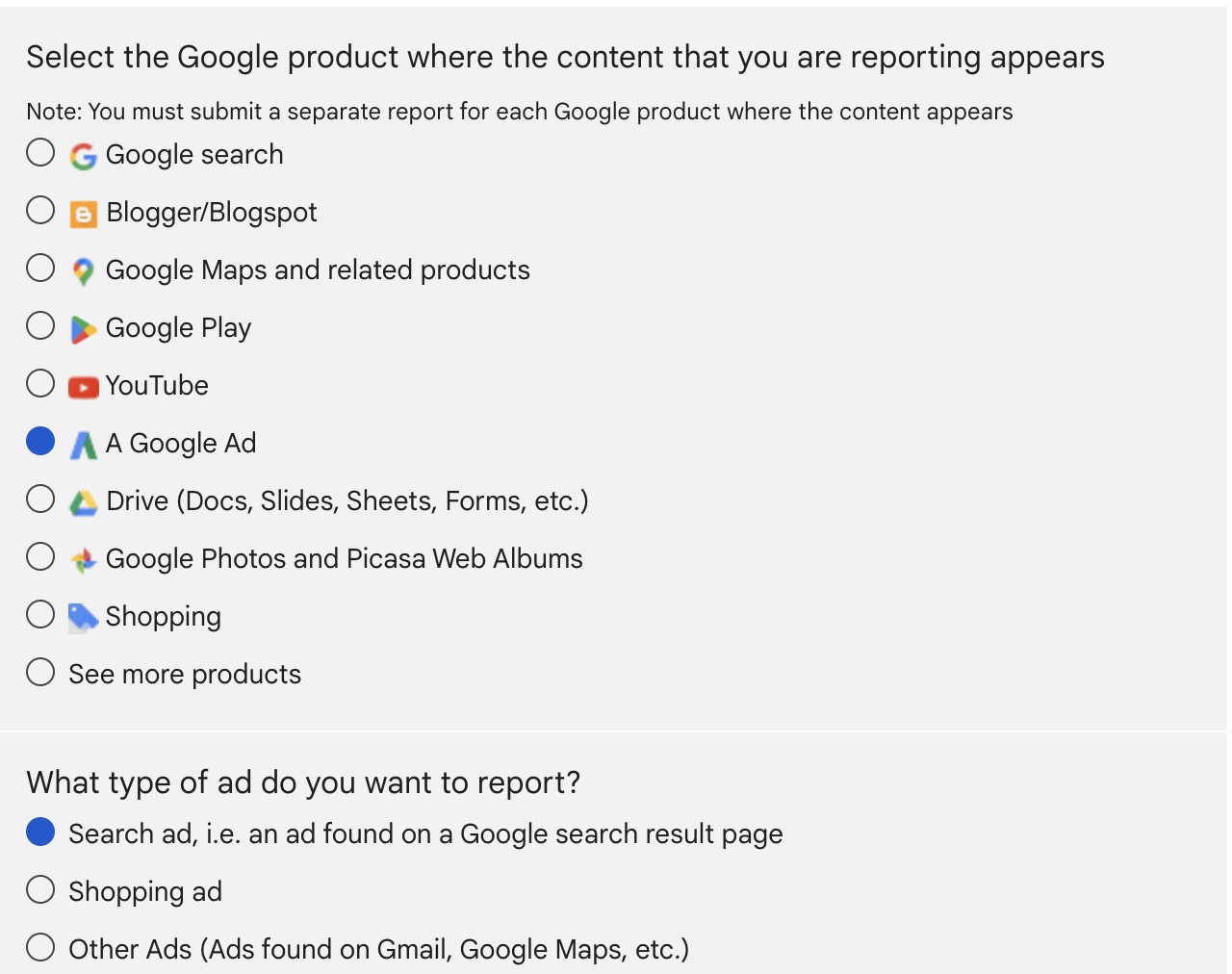
Step 2: Select ‘A Google Ad’ and ‘Search Ad’ as the content you are reporting.
Step 3: Select the reason you wish to report the content.
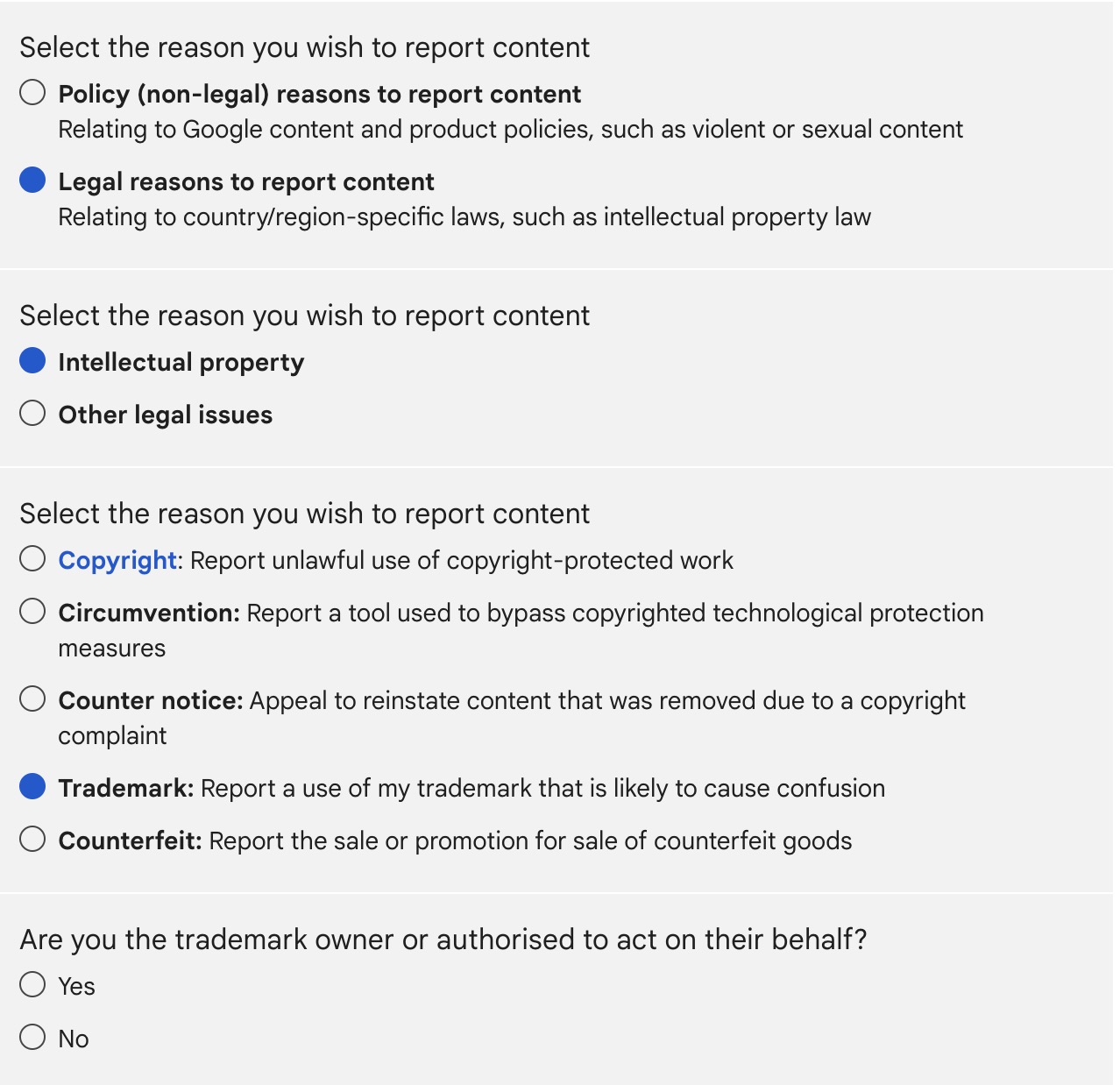
Here select ‘Legal reasons to report content’, ‘Intellectual Property’, ‘Trademark’ and confirm that you are the trademark owner.
Step 4: Create a request.

Step 5: Provide information about the trademark owner.
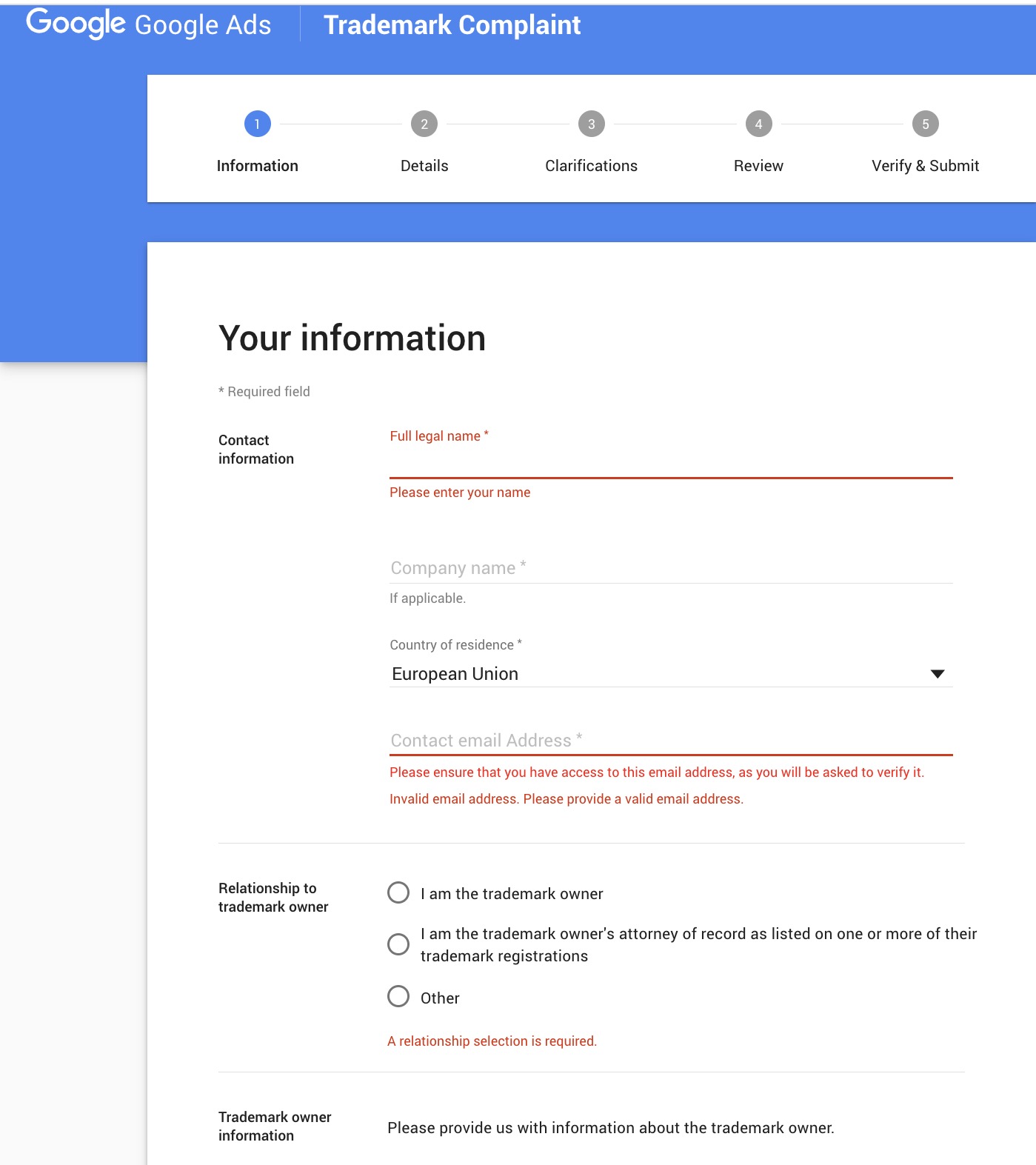
Step 6: Specify details of the infringing ad alongside information about your trademark.
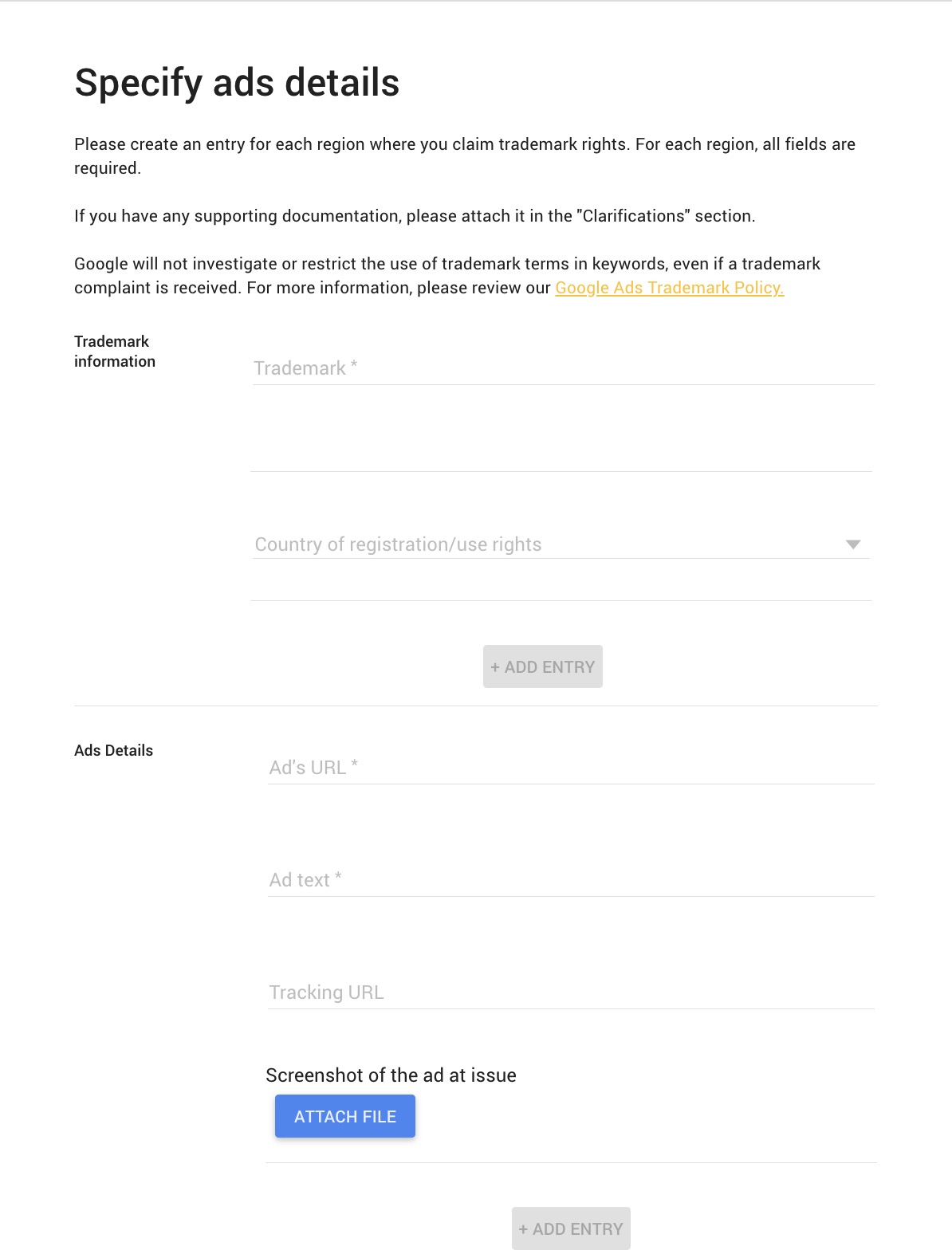
Step 7: Attach supporting documentation then verify and submit your report to Google.
Keep your own record of the complaint, the original ad, and the URLs involved. This is useful if the same advertiser returns with a different campaign or domain.
What happens after you submit the complaint?
Google reviews the report against its advertising policies and determines whether restrictions or other action are appropriate.
There is no reliable universal review time that brands should build into their enforcement plans. The complexity of the case, evidence supplied, and type of policy issue can all affect what happens next.
If no action is taken, check whether:
- The trademark actually appears in the ad rather than only as a keyword.
- The complaint identifies the advertiser correctly.
- Your trademark rights cover the relevant territory.
- The explanation clearly identifies why the use is problematic.
- The issue would be better reported under another Google policy.
Continue monitoring after submitting the complaint. Removing one advertisement does not necessarily stop the advertiser from launching another version.
When should you use a different Google reporting route?
Not every fake or misleading Google Ad is primarily a trademark case.
Counterfeit products
Ads promoting fake goods that imitate protected products or carry substantially indistinguishable trademarks may fall under Google’s counterfeit goods policy.
In these cases, documenting the fake product and seller may be more important than arguing that ordinary trademark use in the ad is unauthorized.
Business impersonation
An advertiser may also pretend to be your business, conceal its identity, or falsely suggest an affiliation with your brand.
Google’s misrepresentation policy covers deceptive practices including certain forms of business impersonation.
Where several violations overlap, preserve evidence of all of them rather than forcing the incident into a single category.
Fake destination websites
Sometimes the advertisement is only the entry point to a larger scam.
If it directs users to a website that copies your branding, products, or checkout experience, investigate the destination as well as the ad. Removing one paid placement does not remove the fake website itself.
When manual monitoring stops being enough
Manually searching Google for your trademarks can work for occasional incidents. It becomes much harder when a brand needs to monitor:
- Multiple trademarks.
- Several countries or languages.
- Large numbers of branded keywords.
- Ads that appear only in particular locations or at certain times.
- Advertisers repeatedly changing accounts or destination domains.
Search ads are dynamic, so your team may not always see the same ad that customers see.
That creates a basic enforcement problem: you cannot report an infringement you never discover.
How Red Points helps protect trademarks in paid ads
Red Points Ad Protection helps over 1,300 brands monitor paid advertising for fake ads and potential IP misuse without relying entirely on manual searches.
Monitoring can be configured around relevant search terms, locations, and frequency. Detected incidents can then be reviewed using information such as ad copy and destination URLs before enforcement.
This can help brands:
- Detect suspicious ads across relevant locations.
- Identify recurring advertisers and campaigns.
- Review ad copy and destination URLs.
- Prioritize potentially harmful incidents.
- Scale enforcement beyond individual manual searches.
For brands dealing with recurring Google Ads abuse, the objective is not simply to submit individual reports faster. It is to create a repeatable process for detecting, reviewing, and acting on new campaigns as they appear.
Learn more about Ad Protection or request a demo to see how Red Points supports paid-ad monitoring and enforcement.
What’s next
Start by separating ordinary branded keyword competition from actionable trademark misuse. When you identify a suspicious ad, preserve the evidence before it changes and choose the reporting route that best matches the violation.
If the ad leads to a fake website or forms part of a wider impersonation campaign, investigate the connected advertiser, landing page, and domains as one incident. This makes it easier to spot recurring campaigns rather than repeatedly treating each advertisement as an isolated problem.
Request a demo today to see Red Points in action.
Frequently asked questions
Can competitors bid on my trademark in Google Ads?
Yes. Google generally does not restrict trademarks simply because they are used as keywords. Whether the ad creates a trademark-policy issue depends more on how the mark is used in the advertisement.
Can a competitor use my trademark in its ad copy?
Google may restrict trademark use in an ad from a direct competitor. Document the exact ad, advertiser, URL, and your trademark rights before filing a complaint.
Does owning a trademark stop anyone from advertising on my brand name?
No. Trademark ownership does not automatically prevent advertisers from bidding on branded search terms. Keyword bidding and trademark use within an advertisement are treated differently.
What information do I need to provide about my trademark registration?
Be prepared to provide details that establish your rights, such as the trademark owner, the registered mark, registration information, and the country or jurisdiction where those rights apply. If you are submitting the complaint for someone else, you may also need to explain your relationship to the trademark owner.
Can I bid on a competitor’s trademark for my own Google Ads?
In many cases, yes. Google generally allows advertisers to use trademarks as keywords. However, using a competitor’s trademark in the ad itself can be restricted, particularly if the use is misleading, confusing, or falls within Google’s rules for direct competitors.
Can an authorized reseller use my trademark?
Potentially. Genuine resellers may be permitted to use trademarks in certain circumstances, particularly when the landing page genuinely sells the relevant goods or services and clearly identifies the advertiser.
What if the ad sells counterfeit products?
Use the reporting route for counterfeit goods where appropriate. Counterfeit advertising is treated separately from ordinary trademark complaints, so the trademark complaint process may not be the strongest route on its own.
Should I report the ad or the website it links to?
Potentially both. Reporting the advertisement can remove one traffic source, but a fake or infringing destination website may require separate enforcement.
How do I know whether to file a trademark complaint or a misrepresentation complaint?
Use the trademark route when the core issue is unauthorized or restricted use of your trademark in the ad. If the advertiser is pretending to be your business, hiding its identity, or falsely suggesting a relationship with your brand, Google’s misrepresentation rules may also apply.
What should I do if the same advertiser keeps running new ads?
Keep records of the original complaint, screenshots, advertiser details, destination URLs, and any new variants you find. Repeated campaigns may indicate a broader enforcement issue, so ongoing monitoring can be more effective than treating each ad as an isolated incident.